As I've mentioned before, I'm currently running the Office 2007 beta. Recently I've been getting the error "The document could not be registered" every time I create a new document, change the style set and at other times.
Apparently the problem is due to the "DCOM Server Process Launcher" service not starting. I was unable to start it manually, but after setting it to start automatically I was able to repair the Office installation and get things running as normal. It also fixed a problem I was having with the MSI installer service, which had stopped me from updating Windows as well as running most installers.
Fixing the DCOM Server Process Launcher
First of all, you need to open the "Services" manager. You can do this either by selecting "run" in the start menu and typing "services.msc", or going to "Control Panel", then "Administrative Tools" and selecting "Services".
You should see a window similar to the following:
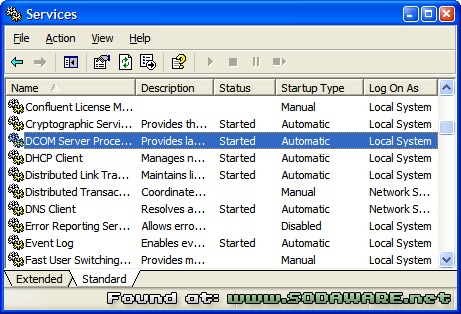
Select the item named "DCOM Server Process Launcher", right click and select "Properties". This should bring up the following dialog:
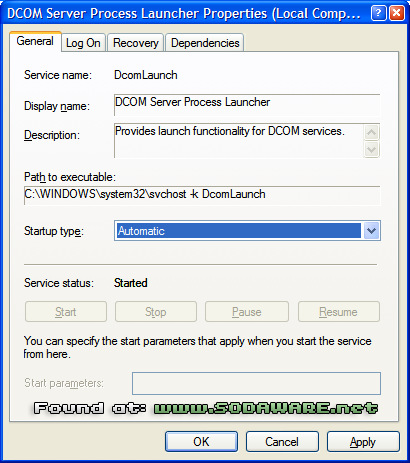
Select "Automatic" from the "Startup type" drop down, and then select "OK". Close the service manager, and then you'll need to reboot.
Repairing the Office 2007 Installation
Once you've rebooted, you should be able to repair your Office installation. Go to the control panel, select "Add or Remove Programs" and select the entry named "Microsoft Office Professional Plus 2007 (Beta)". Click the button called "change", and then select "repair" from the options. This should then start the repair process. It took quite a while for me, so you might want to make a cup of tea or knit a jumper whilst you're waiting. Once it's finished, it'll ask you to reset. Once you're reset your machine, everything should be back to normal. Phew!
Update: Jack and Mike have both found that giving the document file a shorter name can solve this problem too. Cheers!
Updated 2: Al Simon also encountered this problem, which was caused by a corrupted file. You can view his solution in the comments below.
17 Comments
I am getting a similar error message from Word 2003. "This document could not be registered. It will not be possible to create links from other documents to this document. (C:\temp\myreport.doc)"
I have checked the DCOM launcher mentioned in your article. It is started and set to Automatic.
I wonder what can be other causes of this error.
Any idea?
Hi yang,
The DCOM server solved the problem for me, so I don't know of any other solutions. Perhaps restarting the service would help, but I don't really know.
Sorry I couldn't be more help.
Hi guys,
Ran into this problem today…on serveral computers…Some say its services and other corrupted registry…
I rename it to a shorter filename and everything was back to normal.
Hope it helps Yang!!
After trying the DCOM services fix (it didn't work) I discovered the same solution. Filename was too long. I renamed it to a shorter name and it fixed the problem.
Thanks Jack & Mike, I've updated the article slightly to reflect your findings. Cheers!
I had this same problem too on a Windows 2003 server for one of my clients. I found a bunch of different "fixes" on the web.
None of them worked. I already had all the proper services started, all the proper regkeys, I uninstalled and reinstalled Office (including removing all files and regkeys by hand), uninstalled Windows updates and fixes, reboot dozens of times … and still nothing worked. Even the filename length wasn't the problem.
Finally, I found the problem. The DCOM Access List for the Word executable somehow (during a Windows service update) became corrupted.
The solution that worked for me:
This entry might say "Microsoft Word Document", "Word Document", "Document", or might just be the GUID for Winword.exe - in my case, it was the GUID {00020906-0000-0000-C000-000000000046}
permissions, and you still need them, click on the "Edit" button, write down all the custom ones you have set. So you can reset them after the next step.
Button. This will clear all the access permissions.
customized entries you wrote down in step #5 above.
That's what fixed this problem for me.
Al Simon
www.virtualmarketingbiz.com
Thanks Al, I've updated the post to suggest your solution :)
Guys,
I have tried ALL of these: making sure DCOM was set to Automatic (it already was) and checking default on Access Permissions (it already was). No help. What file name would have to be renamed to try that fix? Also, do the Configuration Permissions matter? Mine have been customized by people who set up my computer, but I'm the only one who uses it. Would resetting that to Default help?
Thanks,
Mary
Hi Mary -
By "configuration permissions", do you mean the DCOM Access permissions?
For the fix that worked for me, you must set it to Default and hit Apply. I would try: set them to default, hit Apply, shut down DCOMConfg, then test and see if the problem is fixed.
If it is, great. If not, you'll have to look elsewhere.
After you test to see if the problem is fixed, then you can restore the original acesses permissions if you want. Whether you should restore them depends on too many factors to list here: whether this is a personal PC or part of a corporate environment, whether it's a server or workstation, what other apps you run, etc.
I hope this helps.
Al Simon
http://www.virtualmarketingbiz.com
Al, thanks, but I do have all that set up as you advise. This appears to be Glitch No. 486 I have to just live with since installing an HP All-in-One to a networked set up. The list just keeps growing…
Thanks anyway!
Mary
Al's solution worked for me. Strangely, there were atleast half a dozen applications whose entries were corrupt. Its working fine though. Thanks.
Hi! Once I had cleaned my computer so deep and when I opened my words document on Microsoft office 2007, it had always been getting the error “The document could not be registered” every time I create a new document, change the style set or save file in the same format and at other times. I didn't know why was that?? and nearly reinstalled my office and, but now, I've solved my problem! Thanks for all your helping! Especially Phil Newton!
Hi Guys
I had Jack and Mike's problem - with a twist!
I am running Office 2007 with Windows 7 and I've just started noticing the problem, despite using this setup for about 18 months. It seems, in my case, to not be the DCOM problem(I looked at this and mine was ok), but a combination of too long a file name and which site I copy my text from.
I copy text from Ancestry UK and FreeBMD to save info I need and I've noticed that even if I disable all hyperlinks in the files, that files made from Ancestry data are ok and files made from FreeBMD data are not. These two types of files are both in the same folder, which is 13 layers deep on my Cdrive.
After finding this I pushed it to its limits and saved an ok Ancestry data file to the same location with a very long file name - and when I reopened it the error message did come up!
Having found this I moved the file a couple of layers up so that the file path was shorter - and now its ok, no error message!
So it seems that I need to re-organise my folders and not give my files too long file names!!
I got this error on just one of 13 files all of a sudden… I had added a date to the file name and the one with the error filename was apparently too long. Shortenening the file name fixed it for me. Cheers! :-)
Great answer – names were too long. Shortened name & error of failure to register document disappeared!
openen word documenten | hilpers
blank documents | keyongtech