Lightning is one of the most powerful extensions for Mozilla Thunderbird. The standard calendar and task list are handy enough, but with a little bit of tweaking it can sync with a number of online services which makes it even more powerful. There are a handful of tutorials for syncing with Remember the Milk, but the extension listed is no longer maintained and is unavailable on the Thunderbird extensions site (the old cache is available here). Thankfully there is a slightly updated version of the plugin that works with the latest version of Thunderbird.
Please note: I didn't write this plugin, but found it on the cached page and am sharing it here as I found it useful.
Install the extensions
Subscribing to the calendar
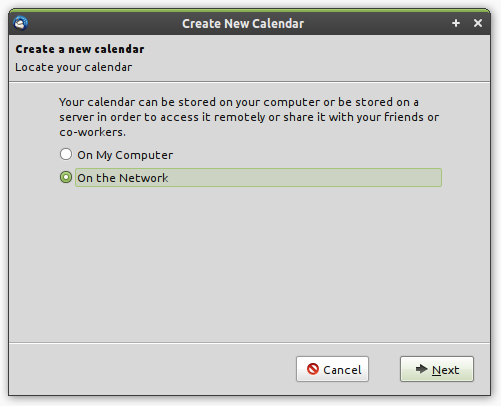
Open a calendar tab in Thunderbird and add a new calendar (right click on the sidebar and select "new calendar"). Add a network calendar, select the "Remember The Milk" provider, and enter a few details.
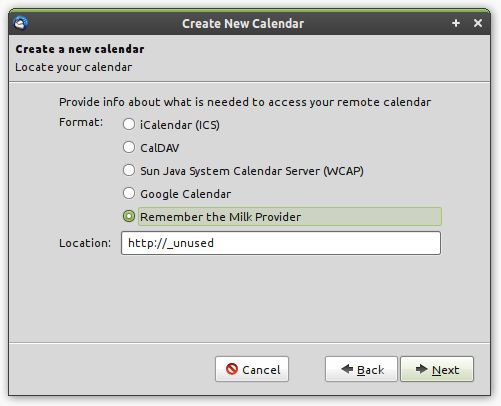
Once this is set up, you'll have a single task that contains details on how to authorize the plugin. Go to the URL in this message and allow the plugin to access your account. Once you see the confirmation screen, head back to Thunderbird and mark the task as complete.

If everything worked, you'll receive a welcome popup in Thunderbird and your tasks will start to sync!
9 Comments
I have been looking for a calendar like this one. I have seen a few but none that are exact fits for my use. Thanks for the post.
This looks quite useful, but I had problems during the installation of your plugin. You wrote that it would be the same like in case of a xpi file, but I couldn't make it with this install.rdf…
Hi jazzabi - I didn't write the plugin, I'm just sharing it here to make it easier for people to find. I checked it locally and it installs here on Linux with Thunderbird 3.1. Are you using a different version?
Hi Phil,
I use Thunderbird 3.1.11pre on Ubuntu 11.04 (32 bit) and I tried to follow your instructions, but after I install the Add-On and restart Thunderbird I still can't see Remember The Milk in the 'Create New Calendar' window after choosing the 'On the network' menu point… :S And I didn't got any error message during the add-on installation…
Hi All,
to get it working, firstly install the plugin and during the create new calendar on network select RTM provider important in location field se the link of calendar from your RTM account instead of using default "
http://_unused........"Once this is set up, you'll have a single task that contains details on how to authorize the plugin. Go to the URL in this message and allow the plugin to access your account. Once you see the confirmation screen, head back to Thunderbird and mark the task as complete.
New note creation from TB is working great and shows up in RTM instantly but its not showing any existing tasks from RTM or any updates from RTM :(.
Wating for some real plugin which work wonder on TB.
It looks like the RTM 0.0.16 plugin is broken for TB5.0 - Lightning 1.0b4. A shame, I'll just have to stay with TB 3.1.11 for the moment.
Hi there,
Thanks for your notes.
Unfortunately the .xpi provided for RTM (0.0.16) doesn't works for thunderbird 9.0.1
Is there any update ?
Thnkx.
Thanks for the post! Lightning is one of the most powerful extensions for Mozilla Thunderbird indeed. But is there any update?
Remember-the-milk und Thunderbird « Huberts Blog